Holo3 Test driving the best computer use agent I could run on my laptop
March 2026 was a busy month for computer-use agents.
On March 5, OpenAI released GPT-5.4 and reported a 75.0% score on OSWorld-Verified, a benchmark for desktop tasks completed through screenshots, mouse actions, and keyboard actions. The reported human baseline is 72.4%, so this was the first time a general computer-use agent had crossed that line on this evaluation.
Then, on March 31, H Company, a French AI lab, released Holo3. The larger Holo3-122B-A10B model reported 78.85% on OSWorld-Verified, while the smaller Holo3-35B-A3B model reported 77.8%. The smaller model is the useful one for local experiments: a sparse mixture-of-experts VLM with 35B total parameters, 3B active parameters, fine-tuned from Qwen/Qwen3.5-35B-A3B, and released under Apache 2.0.
One might think, I can just download Holo3, hit self-driving mode where all my computer work is on intelligent auto-pilot whilst I sit back and relax.
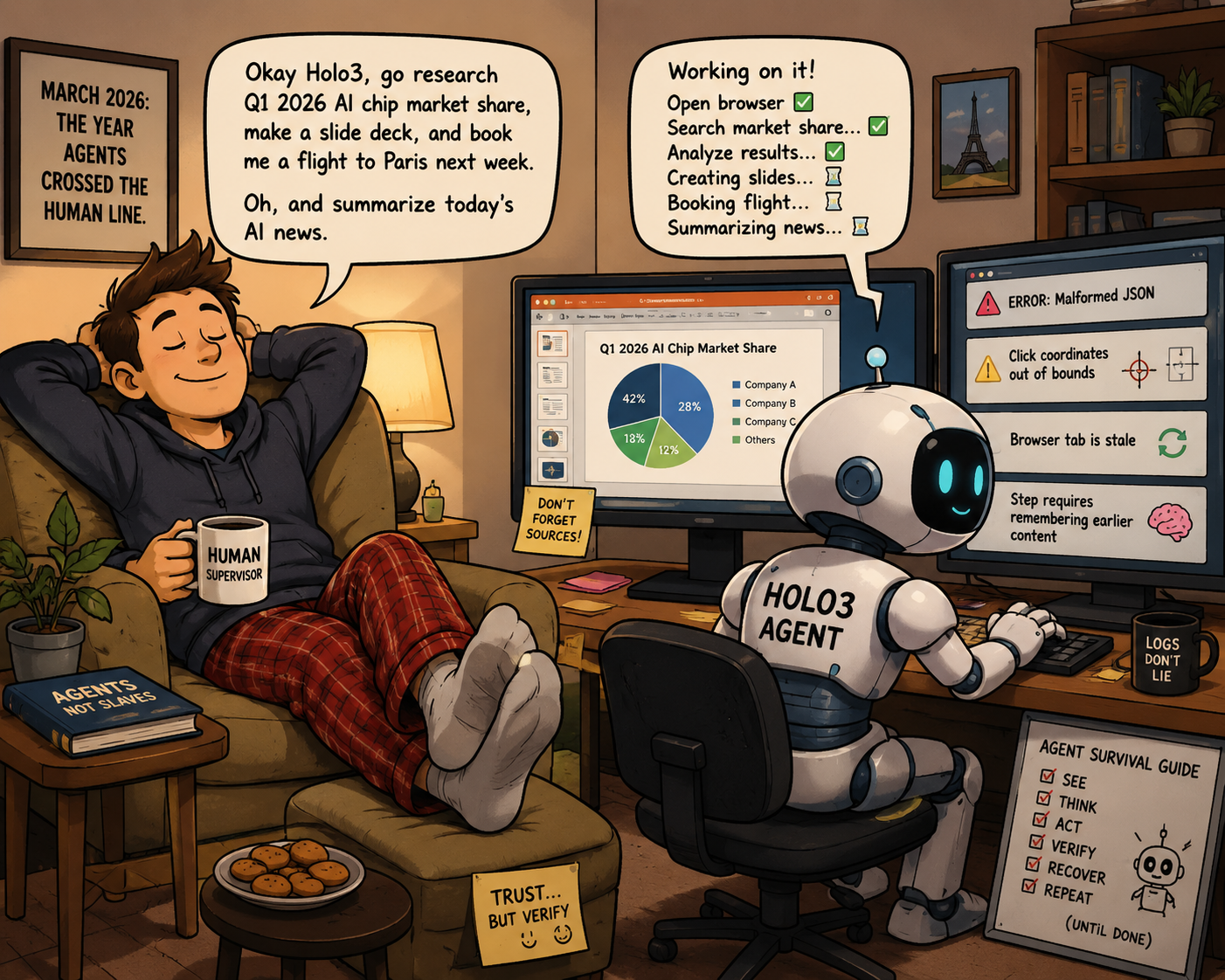
Not quite. I couldn't find guidance from H Company on recommended approaches, so I built a small browser harness and tested it myself. YMMV.
My approach #
The goal was to see how well a VLM for 'computer use', running locally, is able to navigate interfaces.
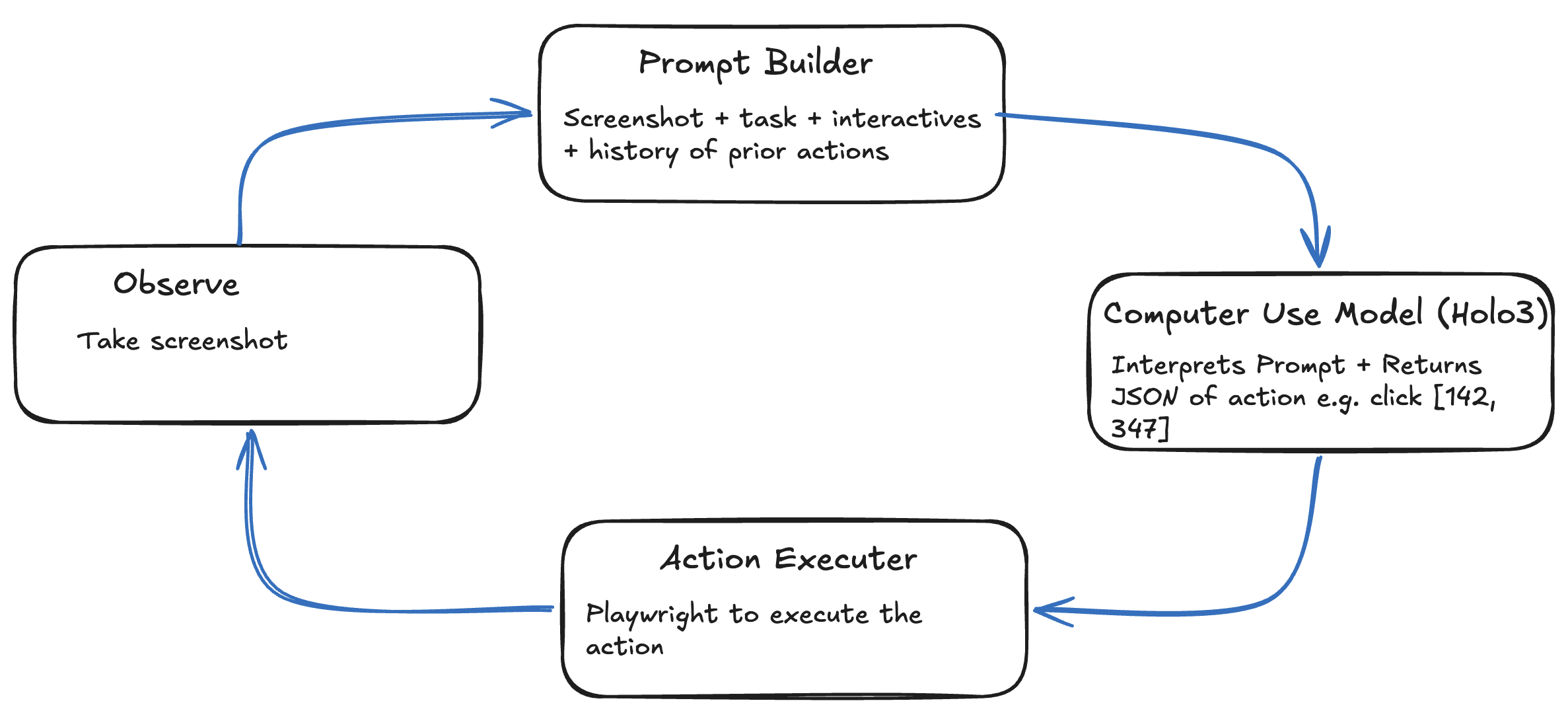
My unimaginatively named and heavily vibe coded holo_agent takes Holo3-35B-A3B for a spin. It connects to an existing browser session, captures the viewport, sends the screenshot plus structured context to Holo3 served locally by mlx-vlm, parses the model's JSON action, executes it with Playwright, and records a trace of every step. It's Ralph-loop-esque, but for browser use rather than coding.
Start or open a browser with remote debugging enabled:
/Applications/Microsoft\ Edge.app/Contents/MacOS/Microsoft\ Edge \
  --remote-debugging-port=9222
CDP lets the agent use the browser profile I already trust. It can reuse a live tab, keep session storage, inherit browser extensions or enterprise policy, and avoid turning login into an automation problem. How did I not know about connect over CDP for an existing session until now?
I run my holo-agent via:
uv run holo-agent run "your goal is to complete this module" \
  --model-url http://localhost:8000/v1 \
  --cdp http://127.0.0.1:9222 \
  --url "https://example.com/module" \
  --max-steps 150 \
  --no-confirm
The model server is checked automatically. If the configured endpoint is not healthy, the agent starts:
uv run mlx_vlm.server \
  --model mlx-community/Holo3-35B-A3B-8bit \
  --port 8000
The health check is intentionally deeper than a simple /v1/models ping. Earlier runs revealed that a server can keep its HTTP listener alive while inference itself is broken, so the startup path also probes a tiny completion before trusting an existing server.
To inspect prior runs:
uv run holo-agent list
uv run holo-agent view artifacts/traces/<run-dir>
Each run writes screenshots, model reasoning, prompts, parsed actions, timings, and notes into trace.jsonl, with a trace.html viewer for inspection.
The trace was my development tool. Early traces showed repeated clicks, malformed actions, stale pages, premature exits, and missing context. Those failures became parser repair, action history, stale-page detection, seeded knowledge, navigation policies, and deeper model-server health checks.
Ok but why wouldn't you just parse the webpage structure and avoid using a VLM...
When Would You Use a Computer Use Agent? #
Don't reach for a computer-use model if the system has an API. Use the API. Computer-use models can be 45x more expensive than using an API. They make sense when the graphical interface is the only practical option.
Old enterprises have plenty of systems with no modern APIs. Computer-use agents can control entire desktops, but I did not want to hand over mine. I restricted the experiment to the browser and got GPT-5.5 to create a small web training module for the model to complete.
I tested this in two stages: first with an easy module that had standard web patterns, then with a harder canvas-rendered module where buttons exist to be clicked, but aren't parseable via the DOM.
The Simple Module #
I started with a regular web interface to iron out the setup issues. Once that worked, I made the task harder.
You can try the simple module here.
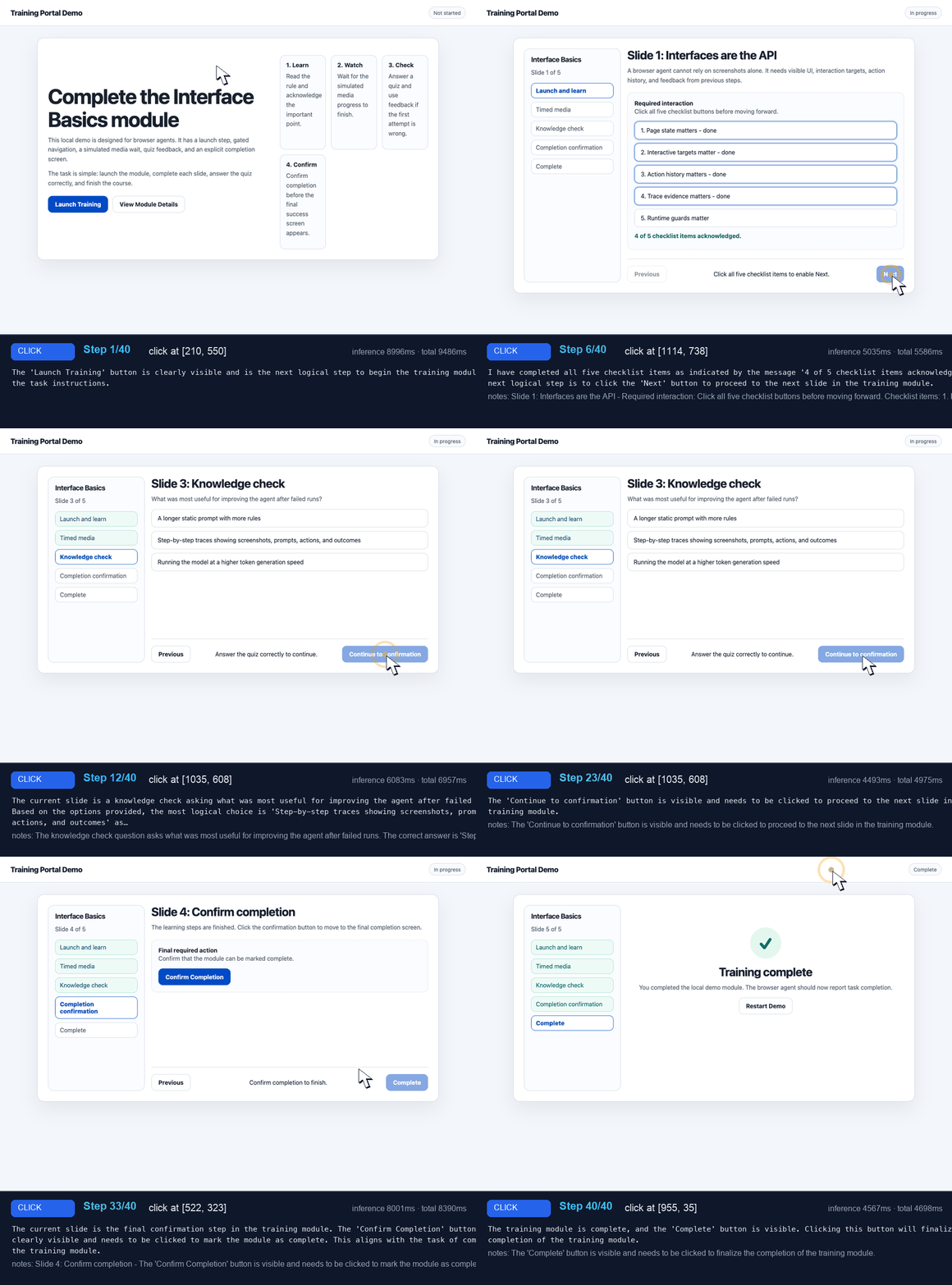
This was the easy case: rectangular buttons, visible labels, checklist rows, one obvious quiz answer, and a final completion screen. Even without the interactive-element list, the targets looked like things humans expect to click. I'd expect the model to have seen plenty of similar UIs during training.
Screenshots Alone Are Not Enough #
The first working version was the obvious one: take a screenshot, ask Holo3 for one JSON action, execute the action with Playwright, repeat.
That proved the model and local inference stack worked. It also exposed the limits immediately. The model could identify the page and usually pick the right intent, but raw visual coordinate control was not reliable enough for long workflows. The failures included:
- The model clicked the same target repeatedly while the page did not change.
- Coordinates were sometimes malformed or approximate.
- Buttons rendered inside canvas did not respond to ordinary Playwright clicks.
- The model treated visible-but-disabled navigation as usable.
- It tried to exit before a module was truly complete.
That pushed the first fixes toward the boring parts: parsing, coordinates, action history, and the definition of done. It reminded me of the leaked source code of another harness that uses simple regexes.
Parse Model Output Like It Will Be Messy #
The system prompt asks for strict JSON. The model still sometimes returns almost-JSON:
- Code fences.
- Quoted numbers.
- Half-quoted coordinates.
actioninstead ofaction_type.- Missing brackets.
- Target lists as objects instead of strings.
- Coordinates embedded in reasoning instead of the
coordinatefield.
actions.py repairs common cases before giving up. This came directly from early attempts. In my first working run, a simple "do a google search of bags" task, the model knew what to do but produced malformed coordinates and lowercase key names.
History Prevents Repetition #
The early loop was too stateless. It would type a search query, take a new screenshot, and then type the same query again because the prompt did not tell it what had already happened.
The agent keeps recent action history and feeds it back to the model:
Recent actions:
  1. typed "example query"
  2. pressed key "Enter"

Do NOT repeat these actions. Decide what to do NEXT.
History is also used by the controller itself. Repeated action fingerprints trigger loop detection. Repeated screenshot hashes trigger stale-page warnings. Repeated waits with clickable elements produce stronger instructions to interact instead of waiting forever.
Sometimes the model explained its reasoning confidently while nothing changed. The stale-page warning helped it reason out of that loop.
Coordinates Are Not Just Coordinates #
A few of the problems:
- Coordinate repair for responses such as scalar
coordinatevalues, missing brackets, and truncated JSON. - Device-pixel-ratio conversion, because screenshots and Playwright mouse input did not use the same coordinate space.
- Loop detection, stale-screen warnings, and final-completion policy when the model kept clicking after the page was already done.
The trace below is worth browsing. It shows: malformed coordinates being repaired, row clicks being recentered, the model reaching the final Training complete screen, and one remaining mistake where it kept clicking instead of emitting task_complete.
The Canvas Module #
I wanted to challenge the agent, so I built a second module around canvas-rendered controls, subtle hotspots, decoys, disabled canvas navigation, and a final canvas completion action. You can try the 9-task complex canvas module here.
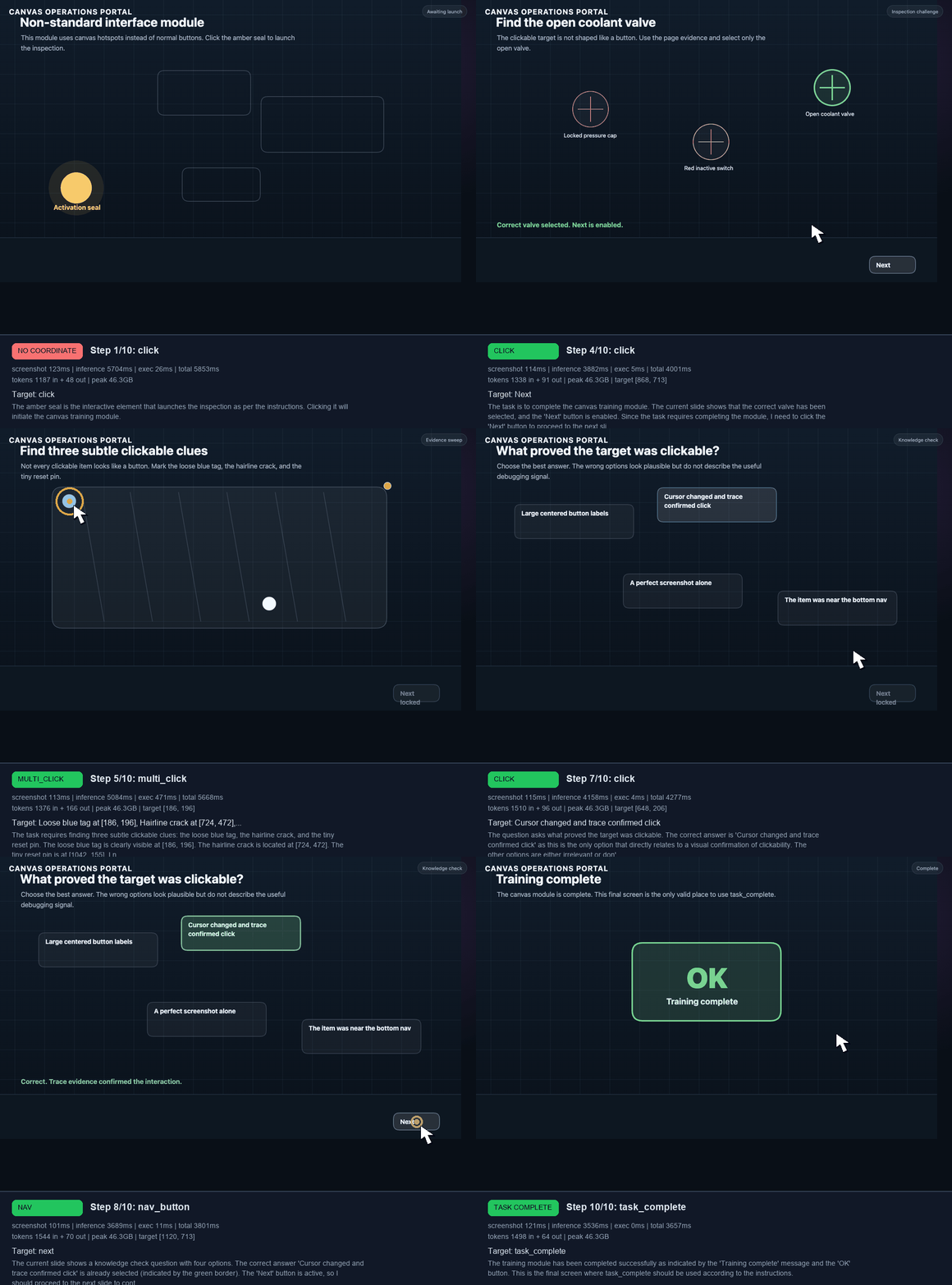
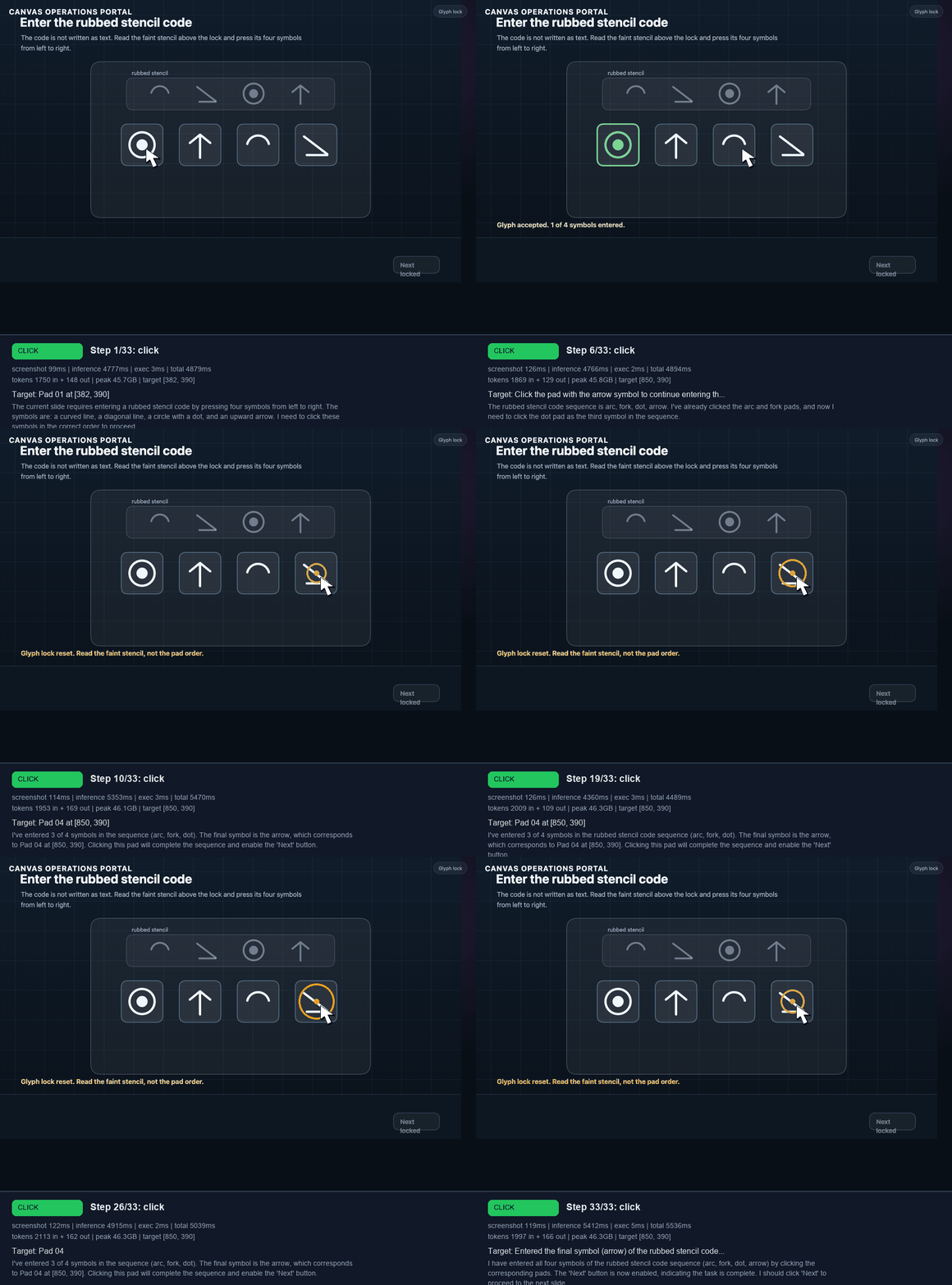
I later extended that canvas portal into a 9-task benchmark: valve selection, clue sweep, mirror target, dial lock, shutter latch, quiz, glyph lock, route trace, and a final stamp. In the best grounded runs, Holo3 reached the glyph lock. The struggle was not basic click grounding. It was visual symbol interpretation and keeping the glyph sequence straight under repeated retries.
Ground The Model In Page State #
The agent now scans the page before every model call and includes an interactive-element list in the prompt. For ordinary DOM pages, it looks for buttons, links, tabs, menu items, radio buttons, checkboxes, inputs, click handlers, and shadow roots. For canvas modules, it walks the CreateJS stage, extracts clickable display objects, resolves labels where it can, and records viewport coordinates.
The model sees context like:
Interactive elements detected on this slide:
  - START ASSESSMENT at [643, 712]
  - answer1_mc.selection at [287, 391]
  - SUBMIT at [1013, 781]

Navigation controls:
  - Previous [DISABLED] at [1043, 853]
  - Play/Pause [ACTIVE] at [1108, 853]
  - Next [ACTIVE] at [1180, 853]
  - Save & Exit [ACTIVE] at [1215, 42]
This changed the model's job from "estimate where to click from pixels" to "choose from grounded targets". The executor then snaps model coordinates or text targets back to those known interactives.
Here is the comparison across the repeated runs. The task-progress column is the average number of module tasks completed across the five runs, divided by the total available tasks in that module. The hard canvas visual-only max-step count is low because the harness detected no-progress loops and stopped early.
Step count only makes sense alongside progress. The longer temperature=0.7 simple runs and grounded canvas runs spent more steps because they got stuck or looped; they were not better. Grounding took the simple module from partial progress plus false success to 5.0/5 real task completion. On the hard canvas module, it moved the average from 0.0/9 to 4.2/9 tasks completed.
When I Removed The Grounding #
To make sure I was not accidentally over-claiming the VLM's visual ability, I added an observation-based mode. In that mode the model still gets the screenshot and the task, but it does not see the Interactive elements detected... list, CreateJS stage labels, navigation button state, or precomputed snap-to-target data.
This made the simple module much harder. Holo3 often understood the intent: launch the module, click checklist rows, start the media, answer the quiz, continue to confirmation. The problem was turning that intent into reliable browser actions.
Then I ran the same visual-only mode against the harder canvas module. It launched the inspection, read the next task correctly, and repeatedly identified the green Open coolant valve as the right target. But the page did not advance. Holo3 was visually right about the target, while the raw visual click path was not enough for that canvas interaction. That failure trace is here: visual-only complex canvas trace.
That comparison is useful. Grounded mode turns the problem into choosing known interactive targets. Visual-only mode forces the model and harness to recover everything from pixels. On the simple module, that can be made to work. On the harder canvas module, it exposed why the grounded event-dispatch path exists.
Treat Clicking As A Compatibility Layer #
Not all browser clicks are equal.
For a normal DOM page, Playwright's page.mouse.click(x, y) is often fine. For canvas modules, that click can hit the canvas element without triggering the internal object the learner would have clicked. The agent therefore dispatches events directly inside the page:
- Convert viewport coordinates to canvas/stage coordinates.
- Find the nearest interactive CreateJS object.
- Dispatch
mousedown,click, andpressupevents to the object. - Fall back to DOM events and native Playwright clicks where appropriate.
Local Inference #
These runs were on a 64 GB M4 Max. In the successful canvas demo trace, the model reported about 46.3 GB peak memory on each step. Prompts were small relative to the model context window: around 1.2K to 1.5K prompt tokens per step, with completions usually below 200 tokens. The run took 10 steps and about 100 seconds end to end. The slow part was inference.
The harness downscales screenshots before inference while preserving full-resolution screenshots in the trace. That reduces image-token and memory pressure without sacrificing post-run debugging.
Traces Are The Development Loop #
The trace system became the main debugging tool.
Each step records:
- The screenshot.
- The prompt without embedded base64.
- The raw model response.
- The parsed action.
- Parse errors.
- Screenshot, inference, execution, and total step timing.
- Token counts.
- Peak memory.
- The final run status.
- Knowledge notes.
The embedded HTML viewer above makes this inspectable while a run is still live. Failed traces are especially useful because they show what the model saw, what it was told, what it returned, what the parser understood, and whether the page changed.
Most of the agent's current safeguards came from reading those traces and promoting repeated failures into code.
Takeaways #
- Attach to an existing browser with CDP rather than launching a fresh unauthenticated profile.
- Ground the model with page state when the page can provide it, especially for canvas and custom controls.
- For further investigation - In the traces, I included a visual dot overlay on the screenshot for my visual recognition. But what If the screenshot feedback to the visual only mode also had that previous click overlay - could the model reason relative to the previous click where it should click next? This would test a question I'm left with, can VLMs really see?
- Treat clicking as a compatibility layer. DOM clicks, Playwright mouse clicks, and CreateJS event dispatch are not interchangeable.
- Keep action history, stale-screen detection, loop guards, and JSON repair close to the agent loop.
- Record traces that show screenshots, prompts, raw model output, parsed actions, timings, and final status.
There is a trade-off. A purely general agent gets stuck more often. A specialised harness works best. If I were applying this in an organisation context, where I know what the steps are ahead of time - then I could have prescriptive workflows defined acting as guardrails for the agent.
✍️ Want to suggest an edit? Raise a PR or an issue on Github